

Scattered lead information
Manual entry and spreadsheet imports bring enquiries into a shared lead workspace.
Organize enquiries, assign leads to the right team members, schedule follow-ups and review sales activity from one lead management workspace.
Add leads manually, import CSV and Excel files, import mapped data from Google Sheets, or connect supported Facebook Meta Lead Ads forms. Integration access depends on permissions and setup.
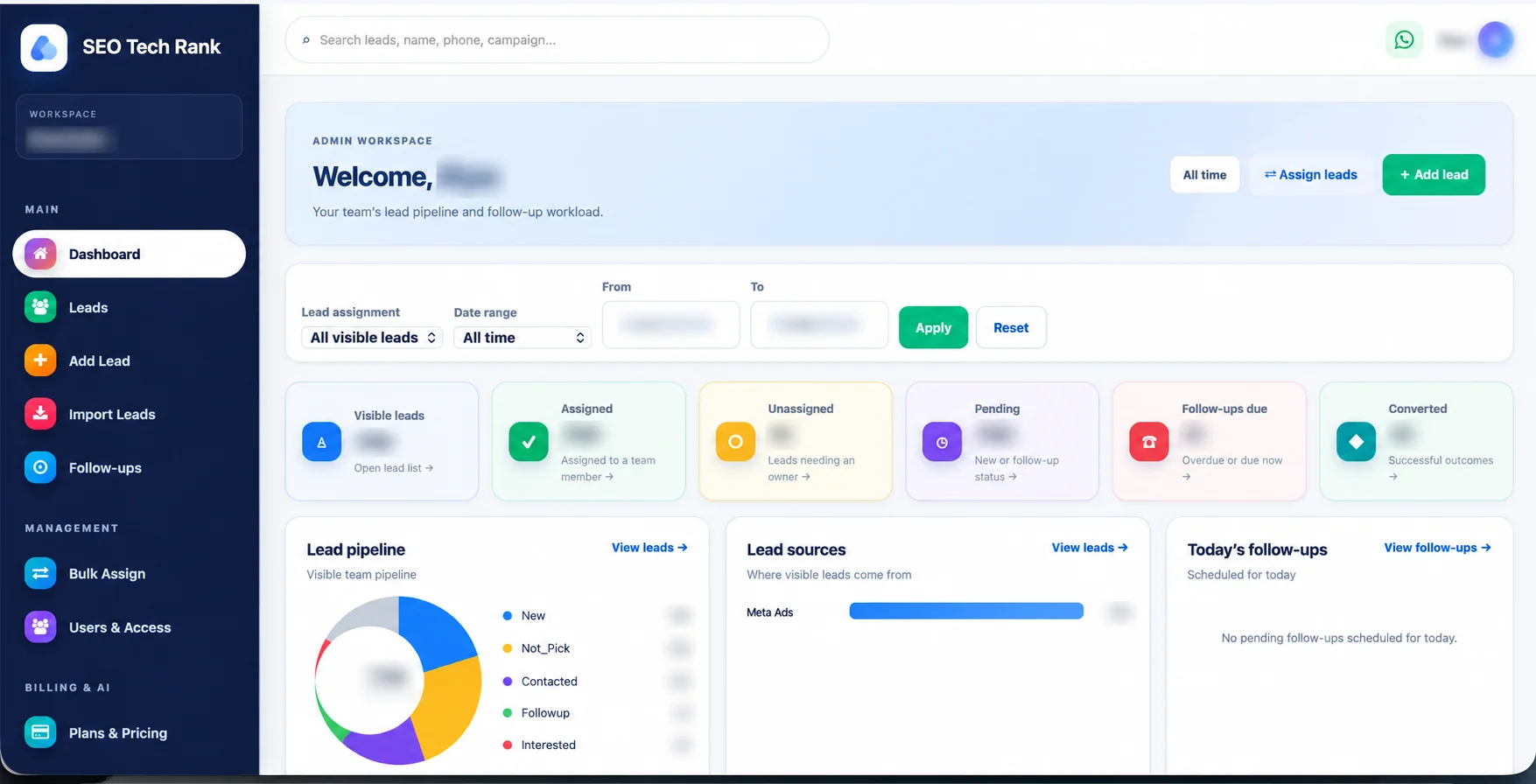
SEO Tech Rank CRM is lead management software that helps businesses organize customer enquiries, track lead status, assign work to team members, schedule follow-ups and review lead activity.
Bring records in through manual entry, CSV or Excel files, mapped Google Sheets imports, and supported Facebook Meta Lead Ads forms. Dashboard reporting includes lead totals, status and source breakdowns, follow-ups, conversions, date filters and team performance views as available in the workspace.
Product: SEO Tech Rank CRM · Category: Lead Management CRM Software · Core use: lead tracking, assignment, follow-ups and reporting.
Explore lead generation support ↗As enquiries grow, small gaps in record keeping and follow-up can make work harder to coordinate.
Manual entry and spreadsheet imports bring enquiries into a shared lead workspace.
Schedule next steps and review due, overdue and upcoming activities.
Use custom statuses and notes to keep lead progress legible for the team.
Import CSV, Excel and mapped Google Sheets data; duplicate leads are skipped.
Use balanced, fixed-recipient, manual or bulk assignment for eligible members.
Review available campaign and source breakdowns in dashboard reporting.
The CRM brings lead records, ownership, follow-up and source details into one workspace so a team can coordinate its next actions.
Manage lead records, search and filter your pipeline, coordinate follow-ups and understand activity across your workspace.
Create leads manually, update details, add notes, set custom statuses and assign a team member to each enquiry.
Find records by name, phone, email, campaign, source, status, assigned member or date.
See due, overdue and upcoming activities, then record a follow-up as completed.
Use balanced, fixed-recipient or manual assignment, and bulk-assign multiple leads. Eligibility depends on workspace and campaign settings.
Synchronize authorized Facebook Pages and forms, then receive supported form submissions with the required Meta permissions and webhook setup.
Map shared-sheet columns to CRM fields and import records. This is a one-way import into the CRM; changes are not written back to Sheets.
Bring in CSV and Excel lead records; duplicate records are skipped according to the import workflow.
See lead totals, new leads, follow-ups due, conversions, source and status breakdowns, date filters and team performance.
Use device calling or open a direct WhatsApp chat with a lead. The CRM does not automate messages or run WhatsApp campaigns.
Admin, Sub Admin and User roles control access to leads, imports, assignment and team management within a workspace.
Workspace member limits and plan upgrades are managed through Super Admin approval. Online payment checkout is not available.
Workspace logo and user profile photo options help teams identify their workspace and account.
It captures supported lead form submissions. It does not create, publish or manage Facebook or Instagram advertising campaigns. Meta permissions, app configuration and webhook setup are required.
SEO Tech Rank CRM supports manual lead entry and lead imports from CSV and Excel files. For Google Sheets, share a sheet, map its columns to CRM fields, and import the data into your workspace. Duplicate leads are skipped through the import workflow.
Google Sheets is a source for importing leads into the CRM. The feature does not write CRM changes back to the sheet and does not provide two-way synchronization. CSV and Excel import is available for teams bringing existing records into the lead workflow.
For Meta Lead Ads, the CRM can connect authorized Pages and synchronize available forms to receive supported submissions. Meta permissions, application configuration and webhook setup are required. This does not include creating or managing ad campaigns.
Schedule a follow-up for a lead, review due, overdue and upcoming activities, and record when a follow-up is complete. This gives team members a practical way to organize the next step in their sales routine.
Use follow-up status alongside lead notes, current status and assigned owner to understand what has happened and what action is next. Each team can agree on a simple daily routine for reviewing work.
The CRM does not send automated WhatsApp messages, email sequences or bulk follow-up campaigns. WhatsApp opens a direct conversation with a lead.
Build a more connected lead-generation plan ↗SEO Tech Rank CRM supports balanced assignment across eligible members, fixed-recipient assignment, manual assignment and bulk assignment. Workspace and campaign settings determine which team members are eligible for a lead.
Administrators can coordinate team access with Admin, Sub Admin and User roles. Permissions govern who can view leads, add or import records, assign leads and manage the workspace team.
Choose the assignment approach that matches your workflow and workspace configuration. This product does not claim AI-powered assignment.
A CRM is most useful when the team agrees on the information to record, how to describe progress and who owns the next action.
Keep the details relevant to responding to the customer. Search by contact or campaign information and use notes for context that helps your team continue the conversation.
Follow your own privacy practices and avoid collecting extra personal information without a business need.
Agree what each custom lead status means and what action should follow. Consistent labels make it easier to use filters and review the dashboard’s status breakdown.
Keep your team's status vocabulary short and easy to apply.
Decide who reviews new enquiries, how an owner is assigned and how completed follow-up is recorded. Use due, overdue and upcoming follow-up views to plan the team's next work.
Workspace roles and permissions determine who can access lead and assignment actions.
The dashboard can show total and new leads, follow-ups due, conversions, lead status breakdowns, lead source breakdowns, date filters and team performance views.
Dashboard figures depend on the leads and activity recorded in the workspace and the selected date range. Call and WhatsApp shortcuts help users contact a lead directly from supported device workflows; they do not automate calls or messages.
Dashboard preview appears above with client names and account-specific metrics blurred for privacy.
Bring enquiries in, keep ownership clear, and review the work your team needs to follow up.
Add an enquiry manually, import CSV or Excel, map a Google Sheet, or connect supported Meta lead forms.
Search by name, contact, campaign, source, status, assigned user or date.
Use balanced, fixed-recipient, manual or bulk assignment for eligible team members.
Set next steps and review due, overdue and upcoming activities.
Add notes, update details and record the current lead status.
Use date filters and available status, source, follow-up, conversion and team views.
SEO Tech Rank CRM brings lead records, imports, team workflows and reporting together for businesses that handle customer enquiries.
Organize enquiry records, assign a responsible team member and keep follow-up activity visible.
Use lead status, notes, assignment and scheduled follow-ups to coordinate customer conversations.
Import leads from supported sources and review available campaign and lead source information.
Import lead lists and organize the next step with the team's assignment and follow-up workflow.
Receive supported submissions from selected Meta lead forms after the required connection setup.
SEO Tech Rank CRM supports lead entry, editing, custom statuses, notes, search and filters, follow-ups, assignment, imports, supported Meta Lead Ads capture, dashboard reporting and workspace roles.
Independent agencies cannot currently add and manage multiple clients themselves. Workspace team management is different from operating separate client workspaces, so the CRM should not be evaluated as a self-service multi-client agency platform.
Plan activation and upgrades require Super Admin approval. The current CRM does not include an online payment gateway. WhatsApp opens a direct chat; it does not automate messages. Meta integration captures supported lead submissions; it does not manage ad campaigns.
SEO Tech Rank CRM includes workspace plans with team member limits. Plan activation and upgrade requests are reviewed and approved by a Super Admin; customers cannot complete online payment because a payment gateway is not currently available.
Contact us to confirm current plan availability, member limits, included access and approval steps before making a decision.
Ask about current plans ↗The CRM supports Admin, Sub Admin and User roles within a workspace. Permissions control access to viewing leads, adding or importing records, assigning leads and managing the team.
Use workspace access carefully when handling customer enquiry information. Signup includes email verification and an access request review. Plan activation and upgrades also require Super Admin approval.
Review the CRM’s privacy and terms information when assessing how your business data is handled. We do not claim security certifications or compliance standards without supporting evidence.
Questions about features, integrations and access.
Lead management CRM software helps a business organize enquiries, track lead status, assign responsibility, schedule follow-ups and review sales activity.
SEO Tech Rank CRM helps businesses manage lead records, search and filter enquiries, coordinate team assignments, track follow-ups, import lead data and review dashboard activity.
Yes. Users can add leads manually, edit lead details, add notes, update custom statuses and assign a team member, subject to their workspace permissions.
Yes. Supported search and filter fields include name, phone number, email, campaign, source, status, assigned team member and date.
Yes. You can schedule follow-ups, review due, overdue and upcoming activities, and record when a follow-up is complete.
Yes. SEO Tech Rank CRM supports balanced assignment across eligible team members, fixed-recipient assignment and manual assignment. Eligibility depends on workspace and campaign settings.
Yes. Bulk assignment lets authorized users assign multiple leads together, subject to workspace permissions.
Yes. Supported Facebook Pages and lead forms can be connected and synchronized so selected form submissions can be received in the CRM. The setup requires appropriate Meta permissions, application configuration and webhook setup.
No. The Meta integration captures supported lead form submissions. It does not create, publish, edit or manage Facebook or Instagram advertising campaigns.
Yes. You can import lead data from a shared Google Sheet by mapping its columns to CRM fields. Duplicate leads are skipped according to the import workflow.
No. Google Sheets is an import source into the CRM. Changes made in the CRM are not written back to the sheet, and two-way synchronization is not supported.
Yes. Lead records can be imported from CSV and Excel files. Duplicate leads are skipped according to the import workflow.
The Google Sheets, CSV and Excel import workflows skip duplicate leads according to the implemented duplicate checks.
The dashboard includes total and new leads, follow-ups due, conversions, lead status and source breakdowns, date filters and team performance views.
Yes. The WhatsApp shortcut opens a direct chat with a lead. Calling a lead uses the device calling functionality.
No. WhatsApp opens a direct conversation. The CRM is not a WhatsApp automation, chatbot or bulk messaging platform.
Admin, Sub Admin and User roles are available within a workspace. Permissions control access to lead viewing, adding and importing leads, assignment and team management.
Not currently. Other agencies cannot independently add and manage multiple clients. Workspace team management does not provide self-service multi-client agency management.
Signup includes email verification and an access request review. Plan activation and upgrades require Super Admin approval; workspace plans have team member limits.
No online payment gateway is currently available. Plan activation and upgrades are approval-based.
Use the CRM sign-in at https://crm.seotechrank.com/accounts/login/ or request an account at https://crm.seotechrank.com/accounts/signup/. Account access is subject to email verification and approval.
Organize lead records, manage follow-ups, assign responsibilities and review your lead workflow with SEO Tech Rank CRM.